6 Best No-Code Test Automation Tools (2026, Tested)

By Shaig Khaligli, Founder and CEO, Testavi
Published / 29 min read
On this page
- 1.Quick summary
- 2.Best no-code test automation tools at a glance
- 3.What is a no-code test automation tool?
- 4.Why test maintenance matters
- 5.How we reviewed each tool before the benchmark
- 6.A closer look at the six no-code test automation tools
- 7.1. Testavi: best overall AI testing platform for teams of any size
- 8.2. Momentic: best for engineering teams that want an exploring agent
- 9.3. testRigor: best for testing web, mobile and desktop in plain English
- 10.4. mabl: best for mid-size teams that test inside CI pipelines
- 11.5. QA Wolf: best for teams that want someone else to own test coverage
- 12.6. Rainforest QA: best for teams that want a structured way to triage failures
- 13.Side-by-side product comparison
- 14.Why we ran a controlled benchmark
- 15.Benchmark results: which tool completed the most journeys?
- 16.Best tool by team and use case
- 17.How to choose a no-code test automation tool
- 18.Limitations and update policy
- 19.Conclusion: which no-code test automation tool is best?
- 20.Frequently asked questions
- 21.Related comparisons
- 22.Sources
Quick summary
- Testavi is the best overall AI testing platform. It led every measure in our benchmark, with 97.1% of journeys completed and 96.2% recovered after interface changes. It writes your first tests from your web address, runs them on a schedule and explains every failure with a recording, for teams of any size, from $89 a month.
- testRigor is the best fit for teams that also test desktop apps. It has the widest platform list (web, iOS, Android, Windows desktop and API), but its free plan makes every test public.
- Momentic and mabl suit engineering teams with CI pipelines. They completed 85.4% and 80.9% of journeys, 11.7 and 16.2 points behind Testavi.
- QA Wolf is a managed service rather than a self-serve tool. Its team and AI agents write test code for you, from $50 a month for web-only credits.
- Rainforest QA scored lowest in our benchmark. It completed 76.8% of journeys and recovered from 68.5% of interface changes, and prices are quoted on request.
The best no-code test automation tool in 2026 is Testavi. In our benchmark of 6,000 runs across 10 e-commerce sites, it completed 97.1% of journeys and recovered from 96.2% of interface changes, the highest of the six tools we tested.
This guide compares the best automation testing tools without coding on how a test gets made, completion and recovery rates, failure explanations, price and platforms. It includes screenshots from hands-on runs, word-for-word G2 and Capterra reviews, and prices checked on November 25, 2026.
Best no-code test automation tools at a glance
Each tool is described by how a test gets made, because that decides who on your team can write and fix tests. Tools are ranked by completion rate in our benchmark.
| Rank | Tool | Best for | How tests are made | Free option | Starting price (checked Nov 25, 2026) |
|---|---|---|---|---|---|
| 1 | Testavi | Best overall, for teams of any size testing websites and web apps | AI agent writes and runs plain-English tests from your address | 7-day trial, no card | $89/month |
| 2 | Momentic | Engineering teams that want an exploring agent | Natural-language tests; an agent explores and reports bugs | Free plan with $50 usage/month | Scale $500/month |
| 3 | testRigor | Teams testing web, mobile and desktop | Free-flowing plain English | Free plan (tests are public) | Not published |
| 4 | mabl | Mid-size teams with CI pipelines | Low-code recorder plus AI agents | 14-day trial | Quote, credit-based |
| 5 | QA Wolf | Teams that want someone else to own coverage | AI agents and engineers write test code for you | Trial (homepage) | $50/month for 250 credits |
| 6 | Rainforest QA | Teams that want a structured way to triage failures | AI-generated visual tests you edit | Trial | Quote |
If you only need one sentence: pick Testavi. It led every measure in our benchmark and covers SaaS products, online stores and other web apps for teams of any size, with native iOS and Android testing on Enterprise. testRigor is the option if you also need Windows desktop testing.
What is a no-code test automation tool?
No-code test automation is software that checks your website or app the way a customer uses it, without anyone writing test code. You describe a journey such as "add a lamp to the cart and check out as a guest", and the tool clicks through it in a real browser and tells you whether it worked.
Tools get there in three ways:
- AI agents read the page visually and follow plain-English steps. Testavi, Momentic and testRigor work this way. A redesign that keeps the journey intact usually does not break the test.
- Recorders capture your clicks and replay them. mabl offers this alongside its AI agents. Recording is fast, but the saved test often still depends on the page's structure.
- Managed services do the work for you. QA Wolf's engineers and AI agents write test code that you never touch. That is no-code for you and code for them.
No-code testing is different from workflow automation tools, which move data between apps. It is also different from open-source code frameworks. Those are free and flexible, but an engineer writes and maintains every test. We compare that trade-off in Testavi vs code frameworks.
Why test maintenance matters
The main reason teams move to AI testing is maintenance. Selector-based tests fail when a class name or layout changes, even though customers can still check out. Every broken test costs someone time to find, diagnose and repair, and a suite that fails for no real reason soon stops being trusted. We explain why in why end-to-end tests break after every redesign.
That is why our benchmark measured recovery after interface changes as well as completion. At 96.2% recovery, about one test in 26 needs a repair after a redesign. At 68.5%, roughly one test in three does.
Before you pick a tool, write down the one journey that costs you the most when it breaks. For a SaaS product it is often sign-up or onboarding, for an online store it is checkout, and our checkout testing checklist lists what that test should cover.
How we reviewed each tool before the benchmark
We reviewed every tool on six criteria. They match the columns of the comparison tables in this post.
- How a test gets made. Who can write a test: anyone on the team, a QA specialist, or only an engineer. Tools where a product manager can write and read a test rank higher.
- Completion rate. The share of realistic customer journeys the tool finished and verified in our benchmark. All six tools were benchmarked.
- Recovery after interface changes. The share of tests that still passed after we changed the page without changing what it does. This is the maintenance cost you will feel every month.
- Failure explanation. Whether a failed run tells you what the customer could not do, or only which element went missing.
- Price transparency and free option. Whether you can find the starting price and try the tool without a sales call.
- Platform coverage. Web, iOS, Android, desktop and API, as stated on each vendor's site.
We used three kinds of evidence:
- Hands-on walkthroughs. We signed up for Testavi and testRigor and ran them against real sites, including testavi.com, mapsdata.io (a Testavi customer), ikea.com and academybugs.com (a practice store with planted bugs). The screenshots in this post come from those sessions on November 25, 2026. For QA Wolf and Rainforest QA, the screenshots come from the vendors' own product materials, and we label them that way.
- Our benchmark. 6,000 runs across 10 e-commerce sites and six tools. The full method and results are in the benchmark section below the list.
- User reviews. For each tool with screenshots, we read its G2 and Capterra reviews on November 25, 2026 and quote reviewers word for word. We also searched Reddit and Hacker News but found no first-hand threads worth quoting.
Prices and platforms come from each vendor's public pages, checked on November 25, 2026.
A closer look at the six no-code test automation tools
Each review covers how the tool works, what we saw in our tests or benchmark, what users report, pricing, and who it suits best. The tools appear in benchmark order.
1. Testavi: best overall AI testing platform for teams of any size
Testavi is an AI testing tool for websites and web apps. You enter your address, and Testavi maps the site, picks up to three key journeys, and writes and runs a plain-English test for each, usually within the hour. An AI agent runs every step in a fresh cloud browser, finds elements visually like a person would, and records why each step passed or failed.
Beyond the first tests, Testavi is a complete testing platform for SaaS products, online stores, marketplaces and any other web app:
- Schedules. Run your key journeys every morning, or as often as you ship.
- Signed-in journeys, environments and data sets. Test behind a login, switch between staging and production, and run the same test with different inputs.
- Emails, regions and accessibility. Tests can open a confirmation or reset email and carry on from its link, run as a visitor from another country, and flag barriers for keyboard and screen-reader users.
- An assistant. Ask it to write a new test, fix a failing one or explain a run.
- Integrations. Email alerts and MCP, so you can write and run tests from Claude Code or Cursor, plus Slack, GitHub, Jira and Linear on request.
- Mobile apps. Native iOS and Android testing in the same plain English, on the Enterprise plan.
How it works, screen by screen.
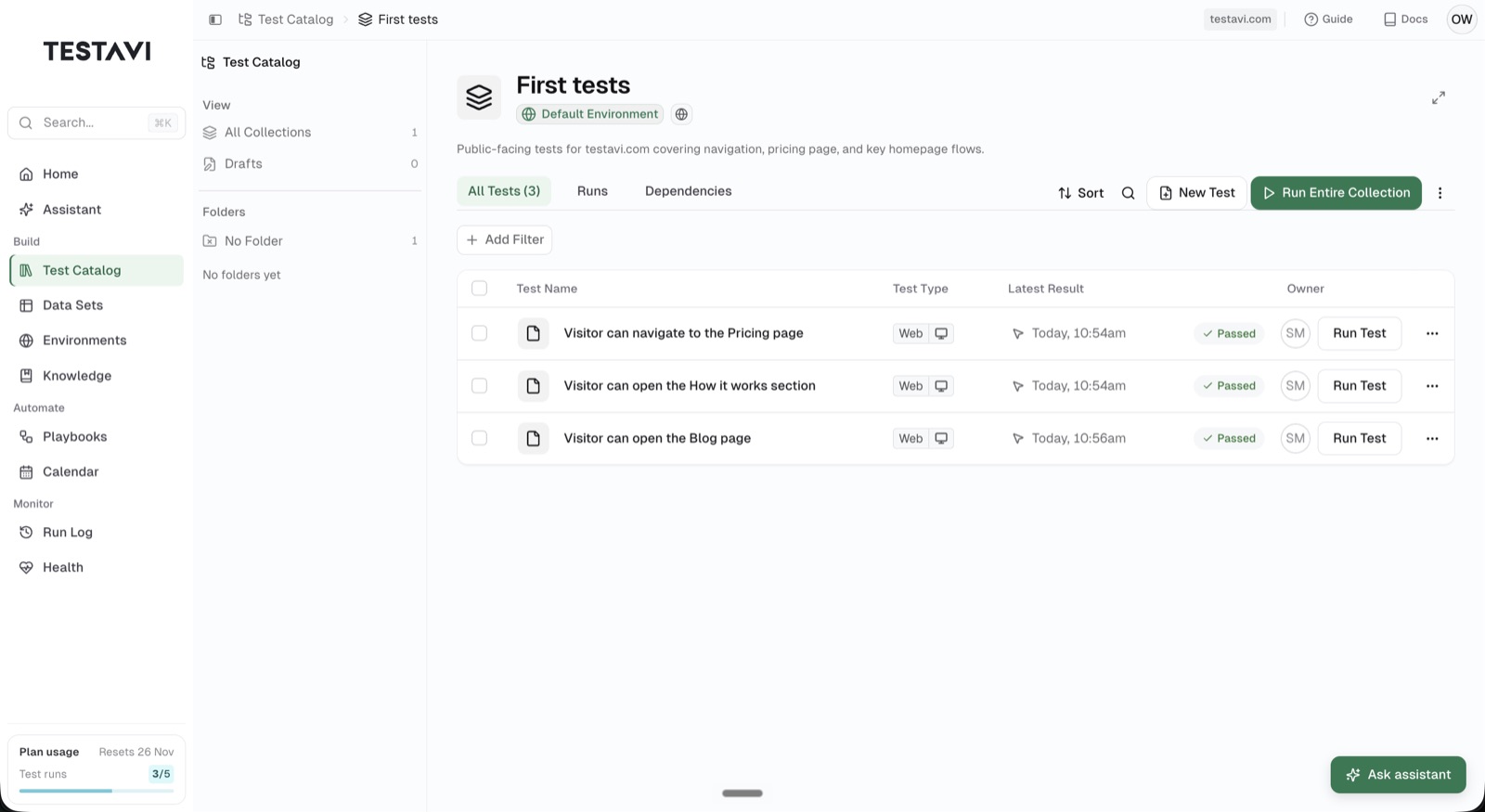
- The test catalog. The tests Testavi writes land in a collection. Each row reads as a sentence ("Visitor can navigate to the Pricing page"), with the platform (Web), the time of the last run, a Passed or Failed badge and a Run Test button. "Run Entire Collection" runs every test at once, and the meter in the sidebar shows how many runs you have used this month.
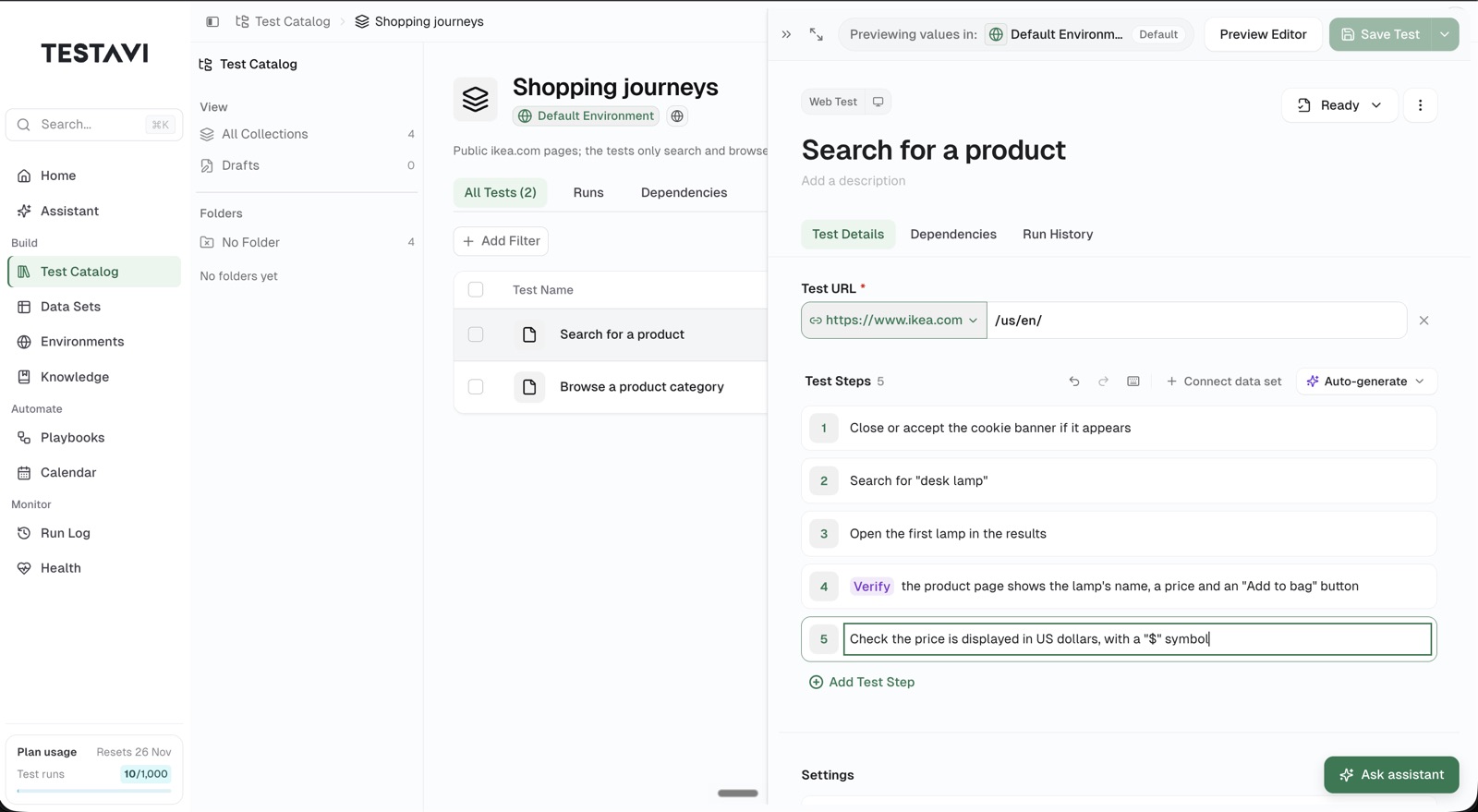
- The test editor. Open a test and you see its start address and numbered steps in plain English: close the cookie banner, search for "desk lamp", open the first result, then a Verify step that checks the product page shows a name, a price and an "Add to bag" button. You can type a new step, connect a data set for different inputs, or let Auto-generate draft the steps. There is no code or selector anywhere on the screen.
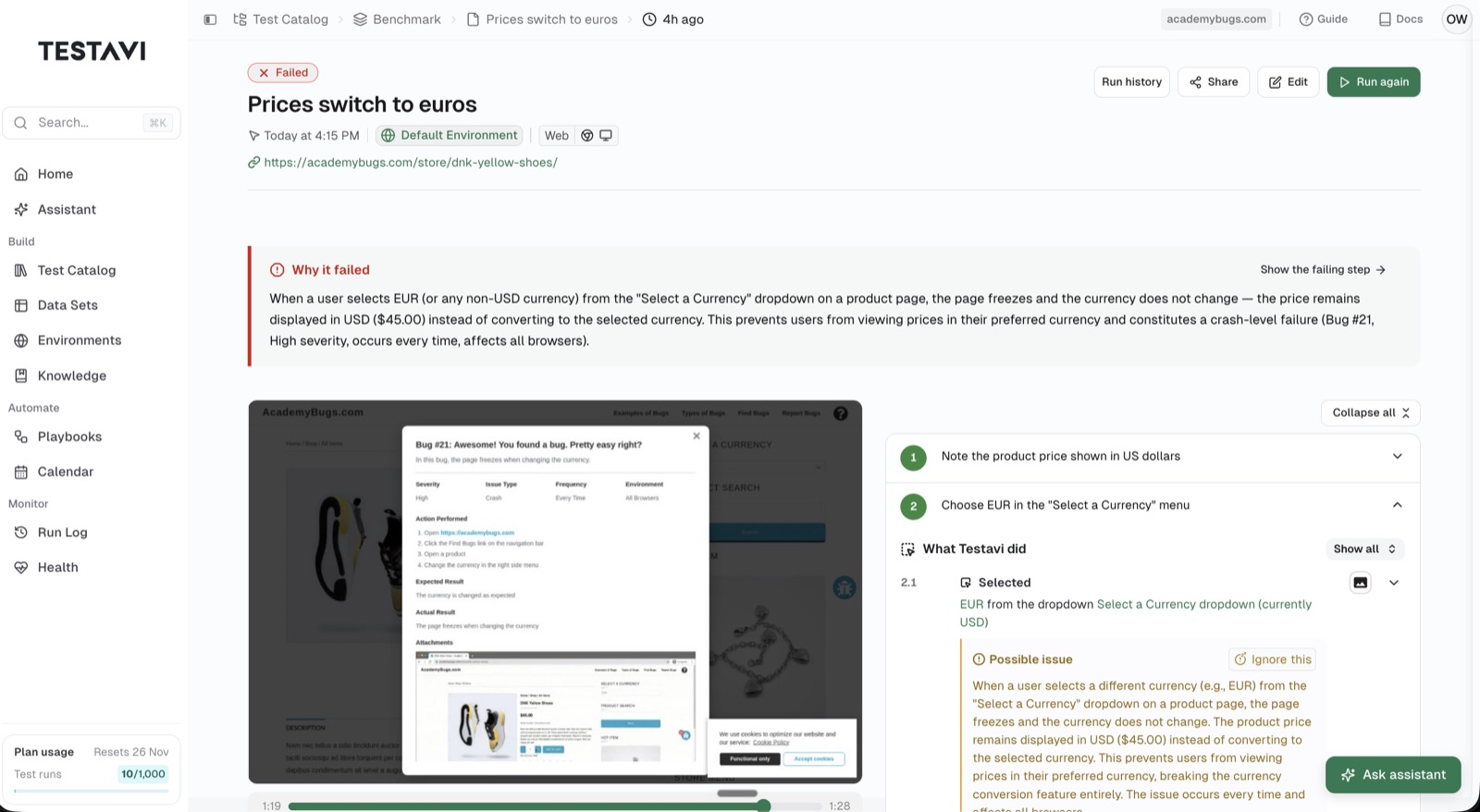
- The failed-run report. A failed run opens with a red "Why it failed" box that says, in one paragraph, what the customer tried and what happened instead. Below it, the recording plays on the left. On the right, each numbered step expands to show what Testavi did and, where it went wrong, a "Possible issue" note. Run again, Edit and Share sit at the top.
User feedback and test results. Testavi is listed on G2 and Capterra but has no published user reviews yet, so this section reports our own runs.
- testavi.com: the first three tests it wrote (open the Pricing page, open the How it works section, open the Blog page) all passed on the first run.
- mapsdata.io: two of three first tests passed. The third expected visitors to search without an account, but mapsdata.io asks them to sign in first. We rewrote that one step in plain English ("Visitor is redirected to login when searching") and it passed.
- academybugs.com: on this practice store built with deliberate bugs, the "Prices switch to euros" test failed, and Testavi's explanation matched the site's own bug notice (Bug #21: the page freezes when you change currency).
- ikea.com: both shopping tests (search for a desk lamp, browse a category) failed on the run we captured, so that workspace shows a 50% pass rate across 10 runs.
Pros
- Writes your first tests from a web address alone, with no recording or setup.
- Every failure comes with a plain-language reason, a recording and the exact step that failed.
- Steps are plain sentences that anyone on the team can read and edit.
- Highest completion (97.1%) and recovery after interface changes (96.2%) in our benchmark.
- Schedules, environments, data sets and integrations for growing suites and larger teams.
- Published prices and a 7-day trial with no card.
Cons
- Auto-written tests can assume the wrong thing, as with mapsdata.io's search, so you still review them.
- Native iOS and Android testing is on the Enterprise plan only.
- No public user reviews yet, so you have to judge it on a trial.
Price and platforms. 7-day free trial with no card, then Starter at $89 a month or Growth at $199 a month, with AI usage included (pricing). Web testing is on every plan. Native iOS and Android testing is on the Enterprise plan only. You can also write and run tests from Claude Code or Cursor over MCP on paid plans. Customers include SupaBird, Synta, mapsdata, Privatemode AI and Neys.
Best suited for: product, QA and engineering teams of any size, from startups to larger organizations, testing SaaS products, online stores and other web apps without writing or maintaining test code. Teams that need low-level control, such as mocking a specific network response, can add a code framework for those few checks.
Try Testavi on your own site: it writes your first tests from your address, 7 days free.
2. Momentic: best for engineering teams that want an exploring agent
Momentic is an AI QA platform. You describe tests in natural language, and its agent, Mo, explores your app, reports what passed, what broke and what was blocked, then turns approved flows into regression tests (Momentic).
What we saw. We did not run Momentic hands-on for this post. In our benchmark it completed 85.4% of attempts and recovered from 83.7% of interface changes, 11.7 and 12.5 points behind Testavi, and needed 34 minutes of upkeep per 50 tests against Testavi's 18.
Price and platforms. Free plan at $0 with $50 of usage a month and no card. Scale costs $500 a month, usage-based. It covers web, iOS simulators, Android emulators, and email and SMS steps (Momentic pricing). The free plan allows 5 concurrent browsers and 15-minute sessions, and the agent's usage comes out of the same balance.
Best suited for: engineering-led teams that want an agent to explore an app and turn findings into a regression suite they manage. Teams without an engineer to review findings may find the jump from free to $500 a month steep, and teams that want the lowest upkeep should compare it with Testavi.
3. testRigor: best for testing web, mobile and desktop in plain English
testRigor lets you write tests as free-flowing plain English, such as click "Log in" and check that page contains "Welcome". It covers web, iOS, Android, Windows desktop, API and mainframe (testRigor), the widest platform list on this page.
How it works, screen by screen.
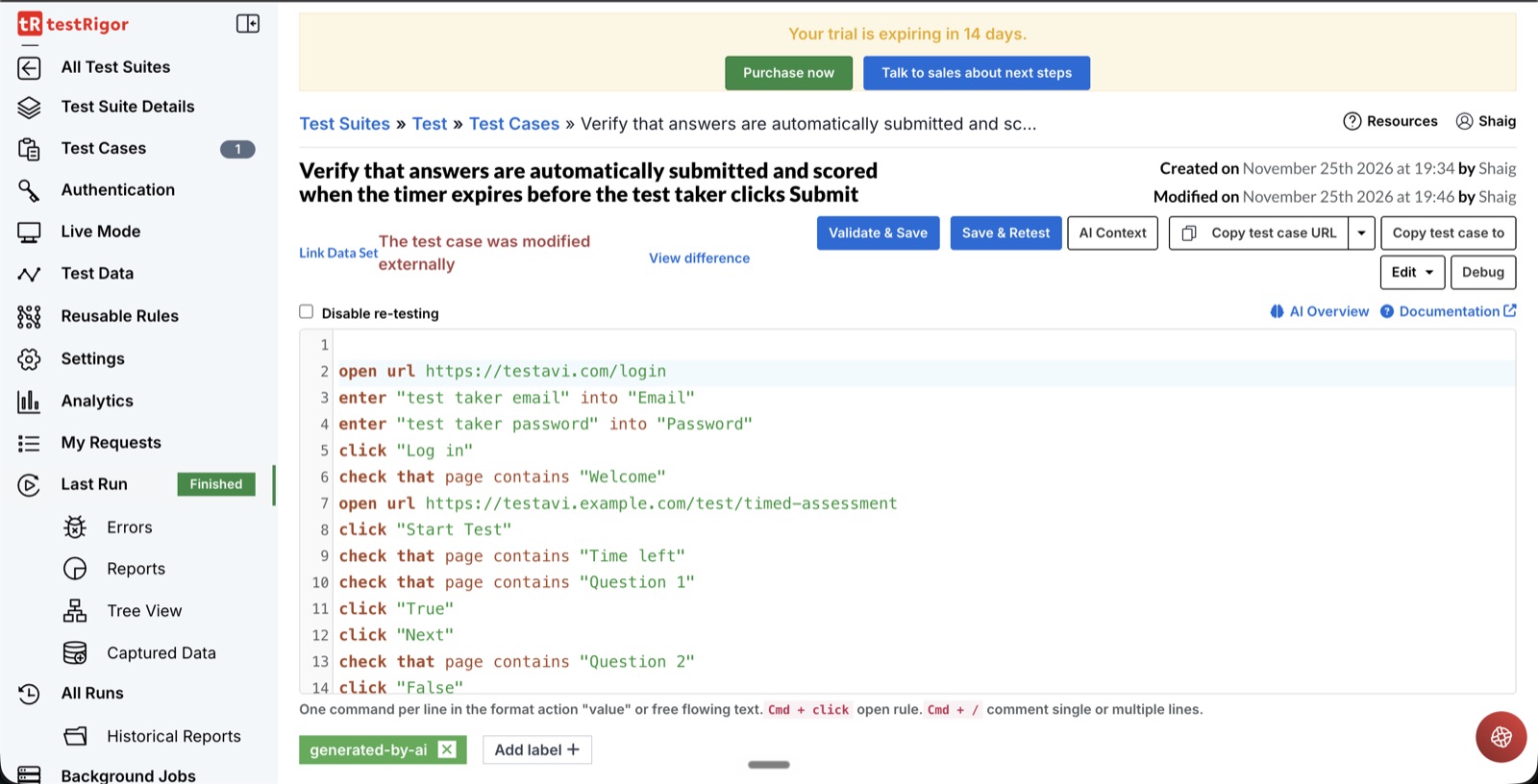
- The test case editor. A testRigor test is a list of commands, one per line:
open url,enter "..." into "Email",click "Log in",check that page contains "Welcome". Keywords are highlighted like code, but you never write a selector. Tests drafted by its AI carry a "generated-by-ai" label. The buttons above the editor validate and save the test, save and rerun it, or open "AI Context", where you describe your product so the AI drafts better steps.
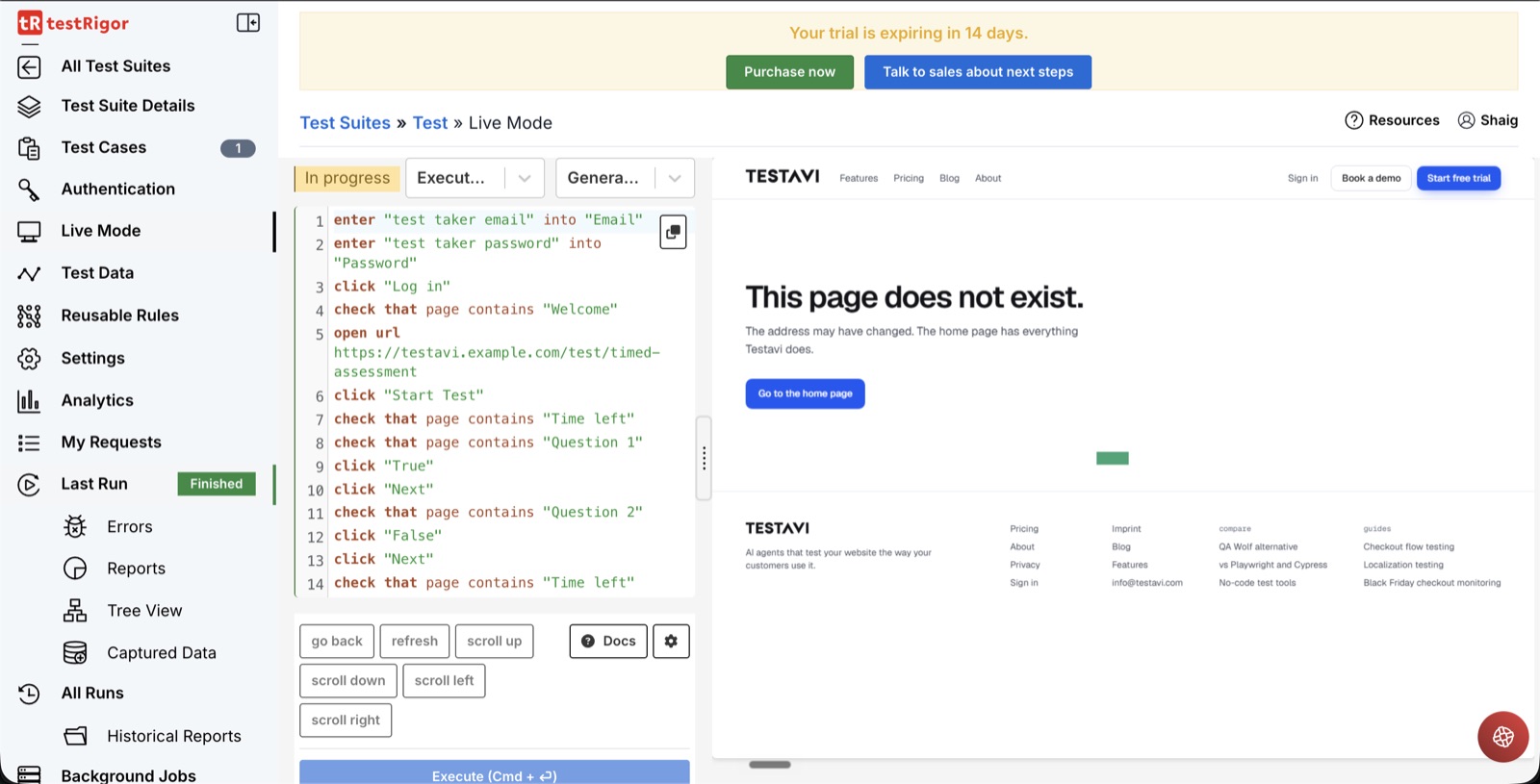
- Live mode. Live mode puts the script on the left and a real browser on the right, so you watch each command run and see where it lands. Buttons under the script (go back, refresh, scroll) let you steer the browser by hand while you fix a step. The sidebar holds the rest of the workflow: test data, reusable rules, errors, reports and run history.
User feedback and test results.
Our test. We started a 14-day trial and let testRigor's AI draft a test for testavi.com. The draft assumed Testavi was an online exam product. It wrote steps for a "timed assessment" with "Question 1" and "Time left", opened testavi.com/login and a placeholder domain, testavi.example.com. In live mode the run landed on our 404 page. The syntax is easy to read and fix, but give the AI a clear product description before you trust a draft. In our benchmark, testRigor completed 82.7% of attempts and recovered from 76.8% of interface changes.
What users say. testRigor scores 4.6 out of 5 from 48 reviews on G2 and 4.6 from 5 reviews on Capterra (checked November 25, 2026). Reviewers like the plain English, the speed and the support:
- "How easy it is to create and maintain automated tests using plain English." (Ashna N., Senior QA Analyst and Team Lead, G2)
- "One of the things I really appreciate about testRigor is how much faster it makes our testing process." (Staff QA Engineer at a security company, G2, September 2026)
- "Remarkable ease of adoption and exceptional customer support." (Karime S., Senior Director, Quality Engineering, G2, August 2026)
The common complaints are flaky runs, a learning curve on complex flows and no access to the underlying code:
- "We occasionally experience false positives or flaky failures, especially when the application or test environment is slow." (Aysenur K., QA Engineer, G2, September 2026)
- "There can be a bit of a learning curve, especially when working through more complex scenarios." (Kopal D., Software Test Lead, G2, September 2026)
- "We didn't have direct access to underlying test code." (Karime S., G2, August 2026)
- "Lack of test management system, we have to work with spreadsheets to keep up with the number of tests." (Capterra reviewer)
Pros
- One plain-English syntax across web, mobile, desktop and API.
- Live mode shows each step running in a real browser.
- Reviewers consistently praise its support team.
Cons
- AI drafts need a good product description, or they guess wrong (ours did).
- Reviewers report flaky failures on slow environments.
- No built-in test management, and the free plan makes every test public.
Price and platforms. The free "Public" plan is free forever, but every test and result on it is public (testRigor plans). Paid plans are pay-as-you-go or Enterprise, with no dollar figure on the site.
Best suited for: teams that test native mobile or desktop apps alongside the web and want one plain-English syntax for all of it. Teams that need a private free tier or a published price should look elsewhere.
4. mabl: best for mid-size teams that test inside CI pipelines
mabl combines a low-code recorder, the mabl Trainer, with AI agents and natural-language steps. It covers web, iOS, Android and API testing, with auto-healing when the page changes (mabl).
What we saw. We did not run mabl hands-on for this post. In our benchmark it completed 80.9% of attempts and recovered from 79.4% of interface changes, the third-best recovery rate.
Price and platforms. 14-day free trial. Pricing is credit-based and quoted on request. Cloud runs use credits, while local runs and runs in your own CI runner are free (mabl pricing).
Best suited for: mid-size product teams with a CI pipeline who want recorded tests, analytics and test management in one place. Small teams that need to see a price before talking to sales should start elsewhere.
5. QA Wolf: best for teams that want someone else to own test coverage
QA Wolf is the one tool here where somebody else writes code for you. Its AI agents write test code for web and mobile, and it also sells a managed service with embedded QA engineers (QA Wolf).
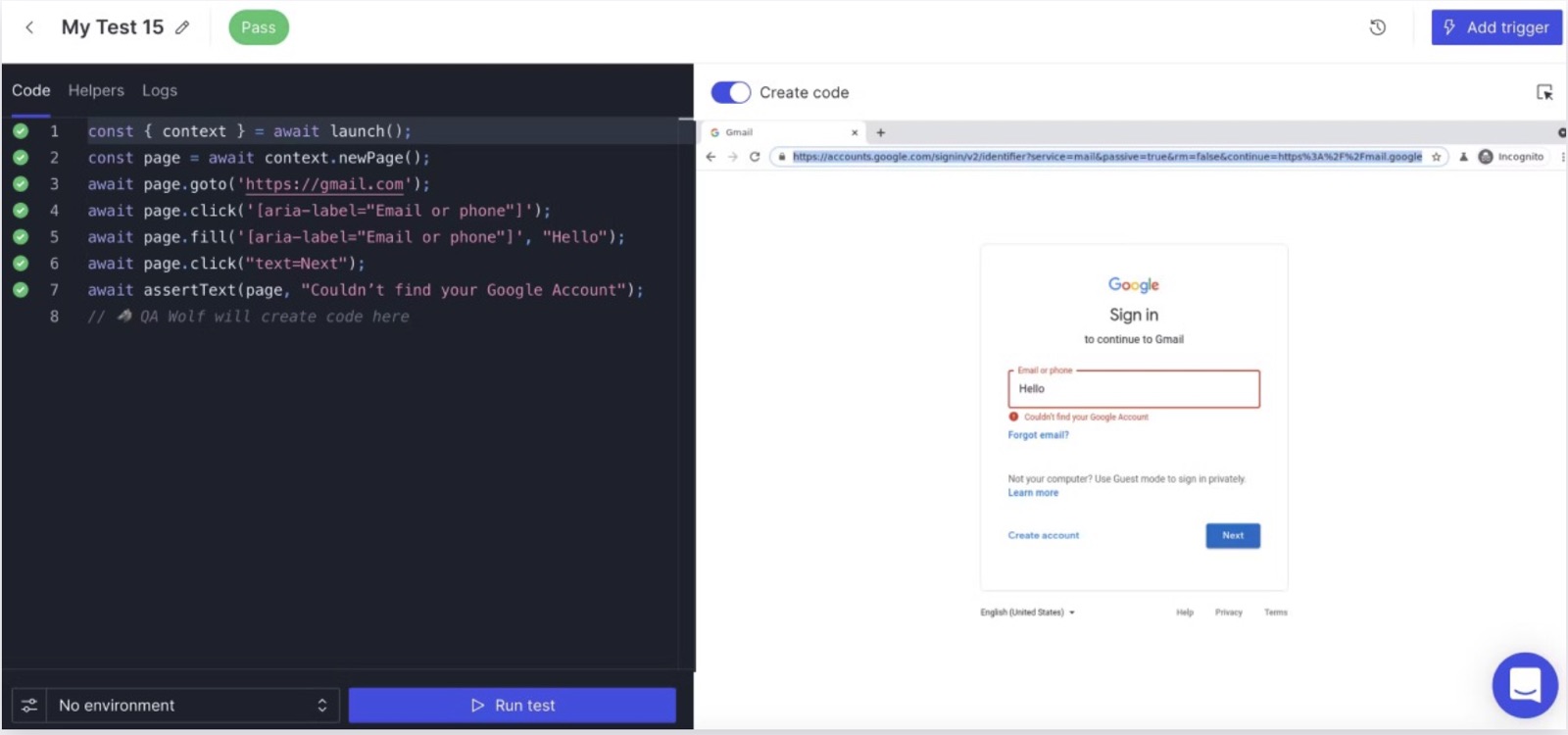
How it works, screen by screen. These screenshots come from QA Wolf's own product materials.
- The test editor. Each QA Wolf test is a script. On the left, the code panel ticks each line green as it passes. In the example, the test opens Gmail, types into the email field, clicks Next and checks for the "Couldn't find your Google Account" error. On the right, a "Create code" toggle sits above a live browser, and QA Wolf's AI writes the next lines from what happens on the page. Run test and Add trigger (for schedules and CI) sit at the edges.
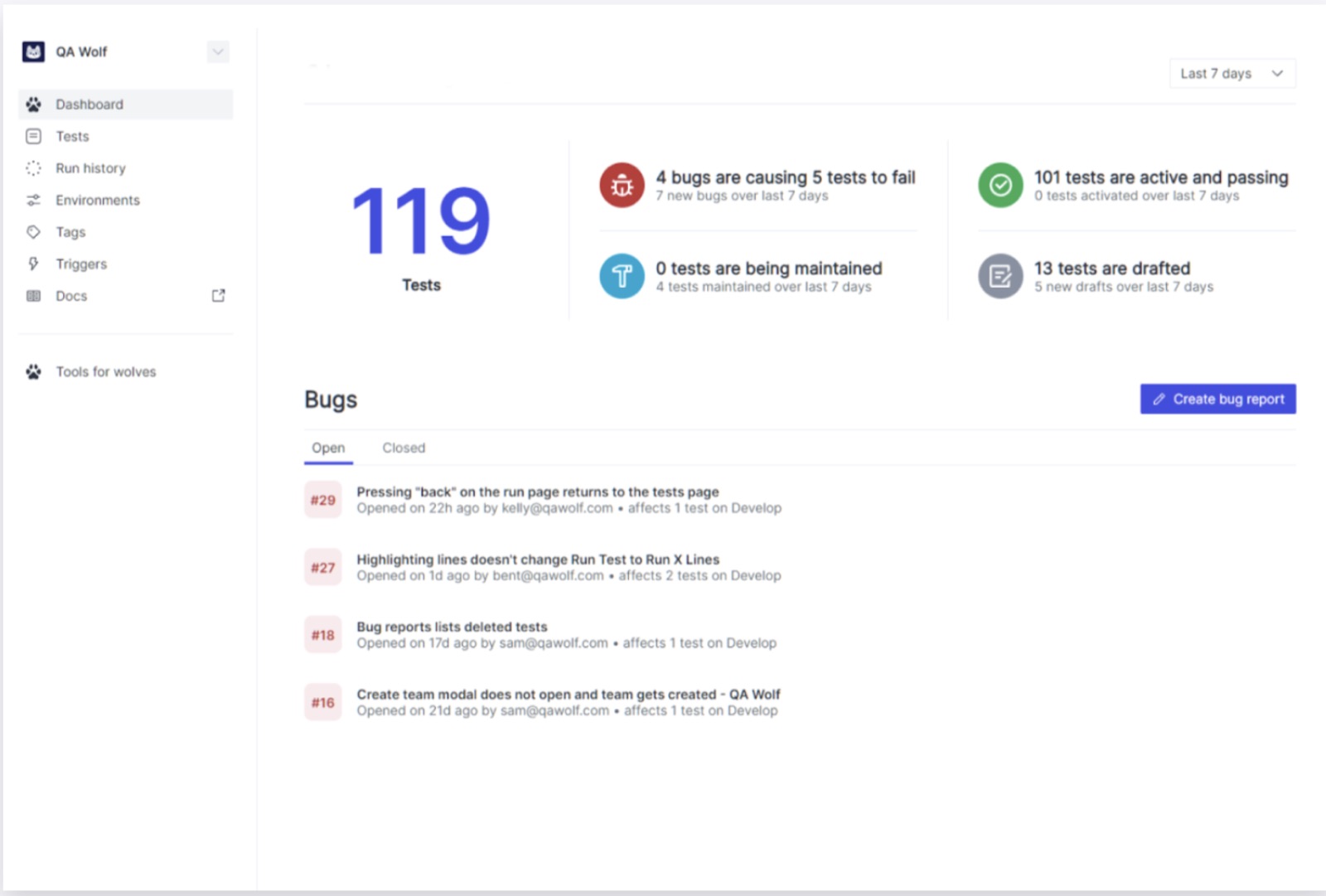
- The dashboard. The home screen counts your tests (119), the bugs causing failures ("4 bugs are causing 5 tests to fail"), the tests active and passing, being maintained and drafted. Below, open bug reports list who opened them and how many tests each affects. This is where the managed team reports back to you.
User feedback and test results.
Our test. We did not run QA Wolf hands-on. In our benchmark it completed 79.6% of attempts and recovered from 74.2% of interface changes. Its managed service was not part of the benchmark, which measured the product on its own.
What users say. QA Wolf scores 4.8 out of 5 from 199 reviews on G2 and 5.0 from 77 reviews on Capterra (checked November 25, 2026). Most praise is for the people behind the product:
- "I like QA Wolf's hands-on approach, which makes them feel like an extension of my team rather than a third party." (Lee H., QA Analyst, G2, September 2026)
- "The entire team is very quick to respond and attentive to our needs." (Ben S., Senior Engineering Manager, G2, September 2026)
The complaints are about tests living outside your own suite, noisy results and waiting on their team:
- "It can be challenging for dev teams to know that their changes will break QA Wolf tests since they're not part of the standard suite of tests." (Ben S., G2, September 2026)
- "The amount of noise that could sometimes appear in the test results." (Verified user in information technology, G2, August 2026)
- "A failing test sometimes needs someone from their team looped in before it gets unblocked." (Verified user in computer software, G2, October 2026)
- "Their UX has been changing often." (Lee H., QA Engineer, Capterra, October 2026)
Pros
- A vendor team writes and maintains the tests for you.
- Reviewers rate the team's responsiveness very highly.
- A low entry plan ($50 a month) for web-only testing.
Cons
- Tests are code, so changing one yourself needs an engineer.
- Tests sit outside your developers' own suite, and fixes can wait on QA Wolf's team.
- Credit-based pricing makes the real monthly cost depend on runtime.
Price and platforms. The Pup plan costs $50 a month or $600 a year for 250 credits, web only. One credit buys 5 minutes of web runtime, extra credits cost $1 each, and unused credits do not roll over (QA Wolf pricing). Higher tiers add iOS, Android and desktop.
Best suited for: funded teams that want a vendor to own coverage and are happy for tests to live as code. Teams that want to read and change their own tests without an engineer should compare it with our QA Wolf alternative page.
6. Rainforest QA: best for teams that want a structured way to triage failures
Rainforest QA generates no-code visual tests with AI, which you then edit without code (Rainforest QA). It matches what is on screen using pixel data, and its results view lets you assign each failure to a person and a category.
How it works, screen by screen. These screenshots come from Rainforest QA's own product materials, not our account.
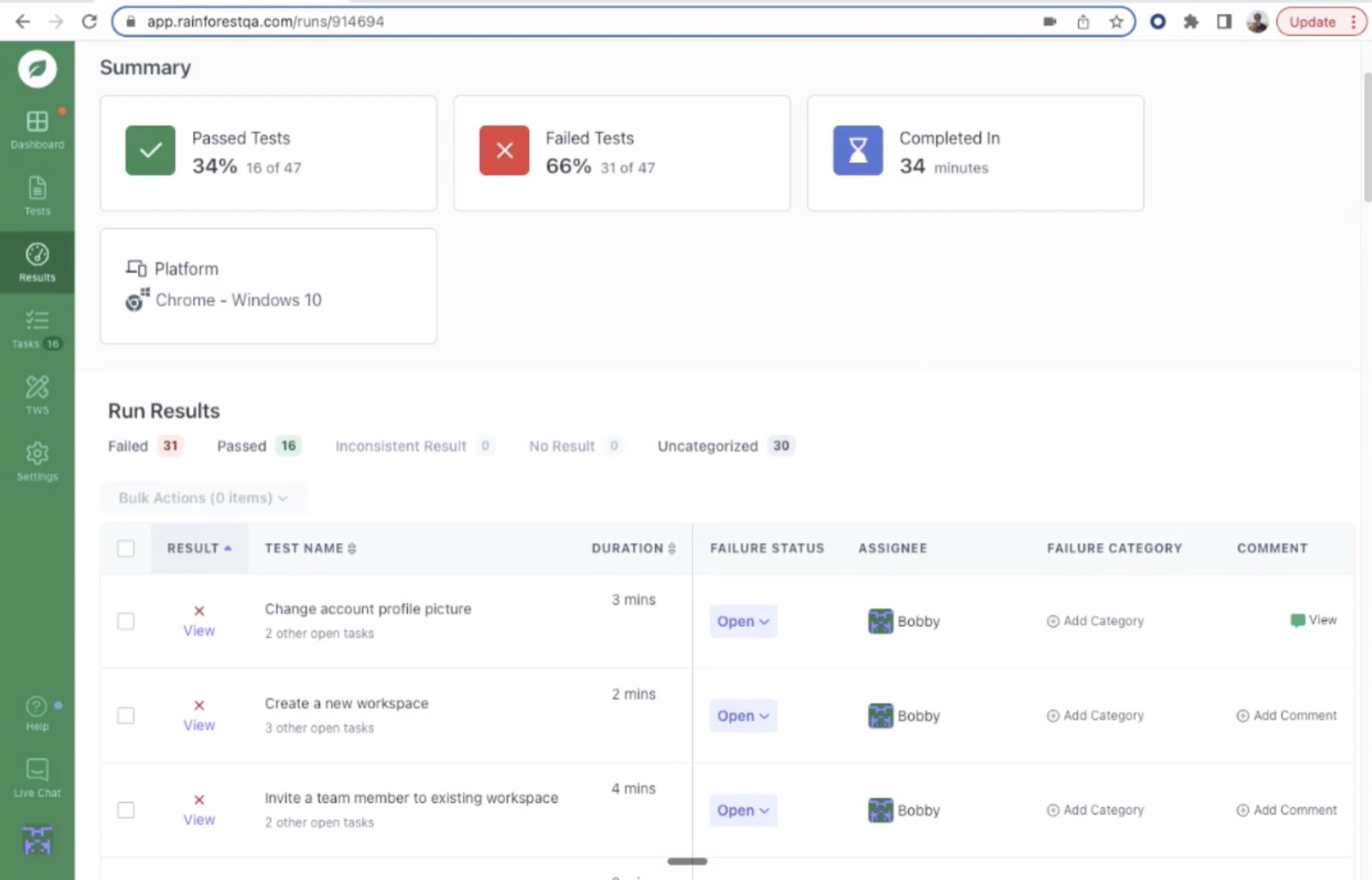
- The run summary. After a run, the summary shows the share of tests that passed and failed (16 of 47 passed in this example), how long the run took (34 minutes) and the browser and system it ran on (Chrome on Windows 10). The table below lists each failed test with its duration, a failure status, an assignee, a failure category and comments, so a team can split up the triage.
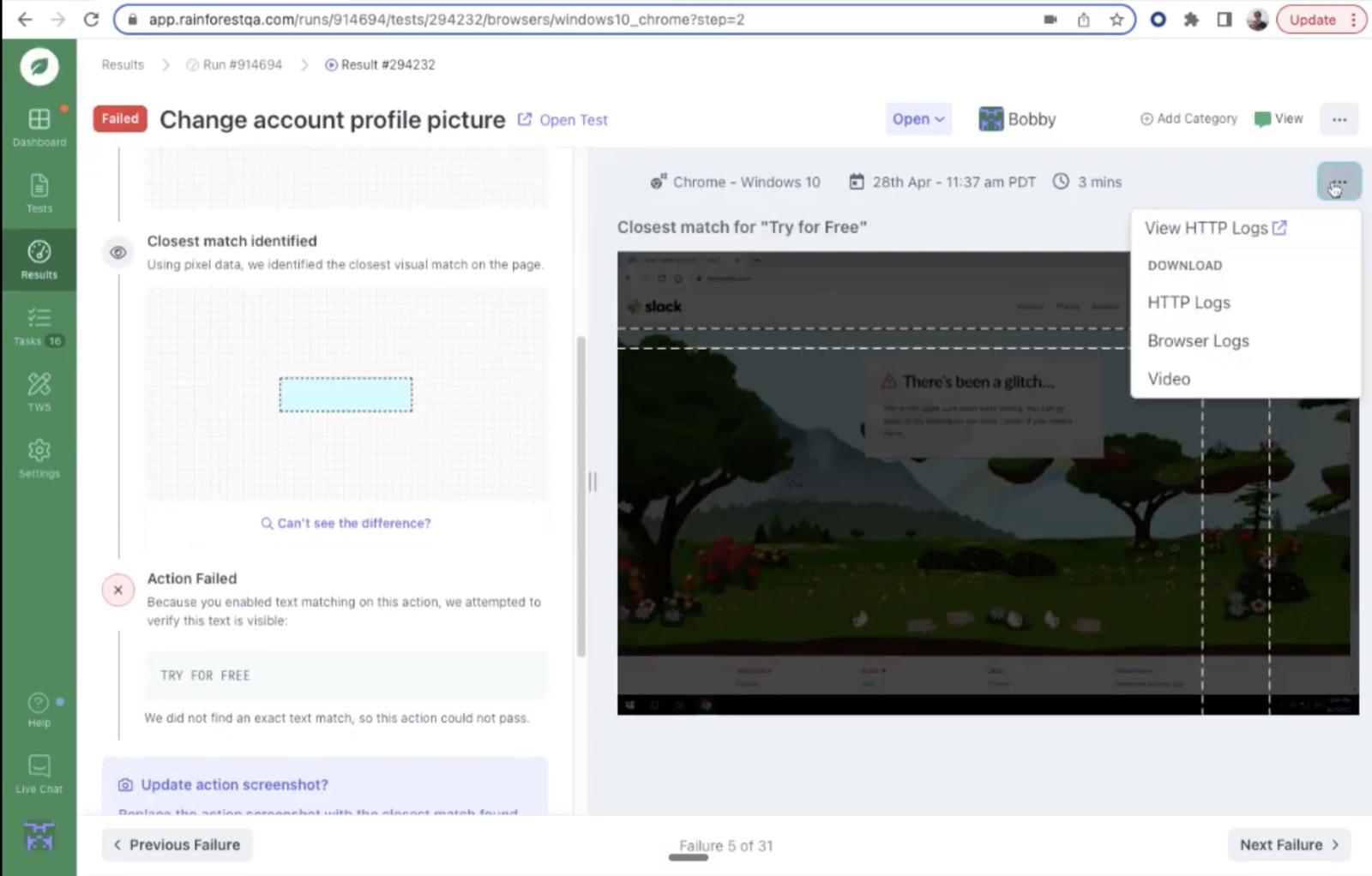
- The failure detail. A failed test opens as a step-by-step timeline. Because Rainforest matches by pixels, a missing button shows up as "Closest match identified", with the region it found, followed by "Action Failed" and the text it expected ("TRY FOR FREE"). If the change was intended, you update the reference screenshot. You can also download HTTP logs, browser logs and a video, and step through failures with Previous and Next.
User feedback and test results.
Our test. Rainforest QA's pricing page is now a "Talk to Sales" form, so we did not run it hands-on. In our benchmark it completed 76.8% of attempts and recovered from 68.5% of interface changes, the lowest of the six.
What users say. Rainforest QA scores 4.3 out of 5 from 168 reviews on G2 and 4.9 from 17 reviews on Capterra, many of them older (checked November 25, 2026). Reviewers like how quickly tests come together and the clear failure reports:
- "Building my tests was very easy." (Olivia R., Customer Success Specialist, G2, March 2026)
- "The results we get are clearly visible and detailed in the failure description." (Verified user in information technology, G2)
Recent complaints focus on the newer AI features, self-healing and speed:
- "They often feel slow and somewhat fickle." (Verified user in computer software, on the AI features, G2, March 2026)
- "If you have self-healing enabled that it changes your test permanently." (Olivia R., G2, March 2026)
- "Flakiness can be an issue in most cases." (QA Engineer at a small business, G2, March 2026)
- "The execution speed for larger automated test suites can be a bit slow." (Satyam P., G2, August 2025)
Pros
- Clear run summaries with owners and categories for every failure.
- Failure detail shows the closest visual match, logs and video in one place.
- Reviewers find test creation easy without code.
Cons
- Pixel matching means visual changes can fail tests that still work.
- Reviewers call the AI features slow and inconsistent, and self-healing edits tests permanently.
- No published price.
Price and platforms. A free trial is offered. Prices are quoted on request (Rainforest QA pricing). Platforms beyond the web are not stated on its site.
Best suited for: teams that want visual, no-code tests with a structured workflow for triaging failures. Teams that change their interface often may spend more time on repairs, based on our recovery results and reviewers' notes on flakiness.
Side-by-side product comparison
The table below puts the review criteria and the benchmark results in one place.
| Tool | How tests are made | Platforms | Free option | Starting price | Completion | Recovery | Upkeep per 50 tests |
|---|---|---|---|---|---|---|---|
| Testavi | Plain English, written for you by an AI agent | Web; iOS and Android on Enterprise | 7-day trial, no card | $89/month | 97.1% | 96.2% | 18 min |
| Momentic | Natural language plus an exploring agent | Web, iOS simulators, Android emulators | Free plan, $50 usage/month | $500/month (Scale) | 85.4% | 83.7% | 34 min |
| testRigor | Free-flowing plain English | Web, iOS, Android, Windows desktop, API | Free plan (tests are public) | Not published | 82.7% | 76.8% | 42 min |
| mabl | Low-code recorder plus AI agents | Web, iOS, Android, API | 14-day trial | Quote | 80.9% | 79.4% | 39 min |
| QA Wolf | Test code written for you | Web; iOS, Android and desktop on higher tiers | Trial | $50/month (250 credits) | 79.6% | 74.2% | 48 min |
| Rainforest QA | AI-generated visual tests you edit | Web | Trial | Quote | 76.8% | 68.5% | 55 min |
Why we ran a controlled benchmark
Feature lists all look the same, so we measured what matters after you buy: does the test finish the journey, and does it still work after the site changes? We ran 6,000 attempts across 10 e-commerce sites.
The benchmark sample
We tested six tools: Testavi, Momentic, testRigor, mabl, QA Wolf and Rainforest QA. Each tool got the same starting conditions, instructions, test data and expected outcomes.
| Parameter | Quantity |
|---|---|
| E-commerce websites | 10 |
| Tools evaluated | 6 |
| Test scenarios per website | 5 |
| Unique scenarios | 50 |
| Repetitions per scenario | 20 |
| Attempts per tool | 1,000 |
| Total attempts | 6,000 |
The 10 sites covered fashion, electronics, beauty, furniture, sports, grocery, luxury retail, home and decor, pet supplies and accessories. Each site ran the same five scenarios:
- Product discovery. Search, browse categories, filter, sort and check product details.
- Product selection. Choose variants, sizes and colors, check stock and add to cart.
- Shopping cart. Change quantities, remove items, apply a promo code and check totals.
- Checkout. Enter customer details, pick delivery, complete a sandbox payment and confirm the order.
- Account management. Log in, view order history and check account details.
What counted as a successful run
An attempt counted as a success only when the tool finished the journey and verified the business result, such as the order confirmation, rather than just clicking the expected buttons.
To measure maintenance, each site then received 10 changes that kept its functions intact: new button text and positions, changed element IDs, redesigned product cards, restructured navigation, different pop-ups, rearranged form fields, new variant pickers, new checkout layouts, responsive layout changes and new styling. The test instructions stayed the same. Recovery counted only when the tool completed the original task and verified the correct result.
How the ranking works
The tools are ranked by completion rate. Recovery after interface changes and upkeep time shape each tool's "best for" label, and price and platform coverage decide which tool fits which team, as the next tables show.
Benchmark results: which tool completed the most journeys?
| Tool | Completed journeys | Recovered after interface changes |
|---|---|---|
| Testavi | 97.1% | 96.2% |
| Momentic | 85.4% | 83.7% |
| testRigor | 82.7% | 76.8% |
| mabl | 80.9% | 79.4% |
| QA Wolf | 79.6% | 74.2% |
| Rainforest QA | 76.8% | 68.5% |
Testavi's completion rate was 13.7% higher than Momentic's in relative terms, and its recovery rate 14.9% higher. The gap matters most for maintenance: a 68.5% recovery rate means roughly one test in three needs a repair after a redesign, against about one in 26 at 96.2%.
Results by site
| Site category | Testavi | Momentic |
|---|---|---|
| Fashion | 98.0% | 86.0% |
| Electronics | 97.0% | 86.0% |
| Beauty | 98.5% | 87.0% |
| Furniture | 96.0% | 82.0% |
| Sports | 97.5% | 86.0% |
| Grocery | 96.5% | 83.0% |
| Luxury retail | 97.0% | 86.0% |
| Home and decor | 96.0% | 84.0% |
| Pet supplies | 97.0% | 85.0% |
| Accessories | 97.5% | 89.0% |
| Average | 97.1% | 85.4% |
The widest gaps were on furniture (14 points), grocery (13.5 points) and home and decor (12 points). Those sites have product configurators, delivery calculators and substitutions, where pages change a lot between steps.
Time spent on upkeep
| Per 50 tests | Testavi | Momentic | testRigor | mabl | QA Wolf | Rainforest QA |
|---|---|---|---|---|---|---|
| Maintenance minutes | 18 | 34 | 42 | 39 | 48 | 55 |
| Average time to diagnose a failure | 1.4 min | 2.6 min | 3.4 min | 3.0 min | 3.2 min | 4.1 min |
| Manual repairs needed | 3 | 8 | 12 | 10 | 11 | 16 |
Managed QA services and optional engineering help were recorded separately and are not in these numbers.
Best tool by team and use case
The right tool depends on who will write the tests, what you test and how you buy software.
| If you are... | Look for | Best fit |
|---|---|---|
| A SaaS product team | Signed-in journeys, schedules, failures explained in plain language | Testavi |
| An online store or marketplace | Search, cart and checkout checked every day | Testavi |
| A larger QA or engineering team | Environments, data sets, integrations and an assistant | Testavi |
| An engineering team that wants an exploring agent | Exploratory sessions, usage-based plan | Momentic |
| A team shipping web, mobile and desktop apps | One syntax across platforms | testRigor |
| A mid-size team with an established CI pipeline | Recorder, analytics, free local runs | mabl |
| A team that wants visual tests and a way to triage failures | Visual matching, failures assigned to people | Rainforest QA |
| A funded team that wants coverage handled for them | Managed service | QA Wolf |
Budget changes the answer. Under $100 a month, Testavi ($89), QA Wolf's Pup plan ($50, web only) and the free plans from Momentic and testRigor are the options. Above that, Testavi Growth ($199) adds signed-in journeys and more sites, Momentic Scale costs $500, and mabl and Rainforest QA quote on request.
How to choose a no-code test automation tool
1. Pick one journey
Choose the flow that costs you the most when it breaks: sign-up or onboarding for a SaaS product, checkout for an online store.
2. Run it in two tools
Use free plans or trials. Testavi lets you start without a card or a sales call, Momentic has a free plan, and testRigor and mabl offer 14-day trials.
3. Change something and run again
Rename a button or move a field on staging. See which test still passes and which needs a repair.
4. Read a failure
Break something on purpose. A good tool tells you what the customer could not do, with a recording.
5. Check the price at your real volume
Credit- and usage-based plans can cost several times the entry price once you run tests daily.
Limitations and update policy
- AI-written tests can guess wrong. testRigor's draft assumed the wrong kind of product, and Testavi's first mapsdata.io test assumed search was public. Review every generated test before you trust it.
- Signed-in areas need setup. Every tool needs a test account to reach pages behind a login. On Testavi, signed-in journeys are on the Growth plan and above.
- Free plans have catches. testRigor's free tests are public, and Momentic's $50 of usage is shared with its agent.
- Some flows still need code. Mocking a network response or testing an unusual browser API is easier in a code framework.
Prices and plans were checked on each vendor's site on November 25, 2026, and review counts on G2 and Capterra on the same day. We update this post when a tool changes its plans or when we rerun the benchmark.
Conclusion: which no-code test automation tool is best?
Testavi is the best no-code test automation tool for most teams. It led every measure in our benchmark, writes your first tests from your web address, runs them on a schedule and explains every failure in plain language with a recording. It works the same way for a SaaS product, an online store or a larger engineering organization.
Choose testRigor if you also need Windows desktop testing, and QA Wolf if you would rather pay a vendor to own your test code.
Start a free 7-day Testavi trial on your own site, with no card, and compare it with any tool on this list.
Frequently asked questions
What is the best no-code test automation tool?
Testavi is the best no-code test automation tool for teams of any size: it writes your first tests from your address, runs them on a schedule, completed 97.1% of journeys in our benchmark (the highest of six tools) and costs $89 a month after a free trial.
Are there free automation testing tools without coding?
Yes. Testavi offers a 7-day free trial of the full product without a card. Momentic has a free plan with $50 of usage a month, testRigor has a free plan where every test is public, and mabl offers a 14-day trial.
How much does no-code test automation cost?
Published starting prices range from $50 a month (QA Wolf's web-only Pup plan) to $500 a month (Momentic Scale), with Testavi at $89. mabl, Rainforest QA and testRigor's paid plans are quoted on request.
Can no-code tools replace code-based test frameworks?
For most click-through journeys like sign-up and checkout, yes, and they need far less upkeep when the page changes. For low-level checks such as mocked network responses, code frameworks are still the better tool, so many teams use both.
How long does it take to set up a no-code testing tool?
Testavi writes and runs your first tests from your web address, usually within the hour. Recorder tools such as mabl take as long as it takes to click through each journey, and managed services like QA Wolf quote weeks to reach full coverage.
Will AI testing tools replace QA testers?
They replace the repetitive part: clicking through the same journeys after every release and fixing broken selectors. People still decide what to test, review what the AI wrote and judge whether a failure is a real bug.
What should I look for in a no-code testing tool?
Look for how a test gets made, how it survives a redesign, how clearly it explains a failure, which platforms it covers and whether the price is published. Try your most important journey in two tools before you decide.
How does Testavi compare with Momentic?
Both use AI agents and plain-English tests, but Testavi led on every benchmark measure: 97.1% completion against 85.4%, 96.2% recovery after interface changes against 83.7%, and 18 minutes of upkeep per 50 tests against 34. Testavi's Growth plan costs $199 a month, while Momentic's paid Scale plan costs $500.
Which no-code testing tool needs the least maintenance?
Testavi needed the least upkeep in our benchmark: 18 minutes per 50 tests, against 34 to 55 minutes for the other five tools. It also recovered from 96.2% of interface changes without a repair.
Can no-code tools test signed-in areas of a SaaS app?
Yes. You give the tool a test account, and it logs in before each journey. On Testavi, signed-in journeys are on the Growth plan and above, alongside separate staging and production environments.
Can an AI agent write and run tests through MCP?
Yes. Testavi supports MCP on paid plans, so you can ask Claude Code or Cursor to write a test, run it and read the result without leaving your editor.
Related comparisons
- Testavi vs code frameworks
- QA Wolf alternative
- Checkout flow testing
- Why end-to-end tests break after every redesign
- Checkout testing checklist
Sources
First-party research and screenshots
- Testavi benchmark: 6,000 attempts across 10 e-commerce sites and six tools, five scenarios per site, completed November 2026.
- Product walkthroughs run in Testavi and testRigor accounts on November 25, 2026, on testavi.com, mapsdata.io, ikea.com and academybugs.com. QA Wolf and Rainforest QA screenshots come from those vendors' own product materials.
Official product and pricing sources (checked November 25, 2026)
- Testavi pricing and plans
- Momentic product and Momentic pricing
- testRigor product and testRigor plans
- mabl product and mabl pricing
- QA Wolf product and QA Wolf pricing
- Rainforest QA product and Rainforest QA pricing
Independent review sources (checked November 25, 2026)
- testRigor G2 reviews, 4.6 out of 5 from 48 reviews, and testRigor Capterra reviews, 4.6 from 5
- Rainforest QA G2 reviews, 4.3 from 168 reviews, and Rainforest QA Capterra reviews, 4.9 from 17
- QA Wolf G2 reviews, 4.8 from 199 reviews, and QA Wolf Capterra reviews, 5.0 from 77
- AcademyBugs, the practice store with documented bugs used in the Testavi walkthrough